


I came across this project on GitHub and built the tool following Tzirf’s guide: https://youtu.be/7ymk8hD7-Hc?si=Fl9qkIjWVtKSxATQ
USBvalve allows you to monitor USB activity so you can be sure a USB drive is safe before plugging it into your system. Every time you plugin a USB into your system, you don’t know what it’s really doing – it could be spreading malware etc.
GitHub repository: https://github.com/cecio/USBvalve
Hardware
- Raspberry Pi Pico (1 or 2)
- I2C OLED screen 128×64 or 128×32 (SSD1306)
- USBvalve PCB
- 1 USB 2.0 Type A female port PCB connector
- 3D printed spacer (optional)
- Anker power bank (optional)
- USB type A to micro USB cable (optional)
Where to buy?
- The Pi Hut
- Raspberry Pi Pico (1 or 2)
- I2C OLED screen 128×64 or 128×32 (SSD1306)
- JCLPCB (or any other PCB manufacturer)
- USBvalve PCB
- Ebay
- 1 USB 2.0 Type A female port PCB connector
Example
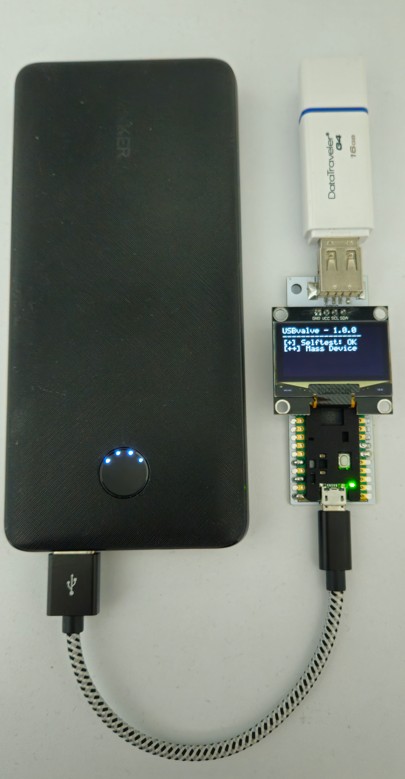
I am powering the device using a power bank, which is optional. In this example, I’ve plugged in a Kingston DataTraveler USB drive and can see it’s behaving as expected as the screen displays:
[++] Mass Device
Information
The firmware creates a fake file system in the Raspberry Pi Pico’s RAM and monitors activity between the USB and the fake file system (The file system has been crafted to expose more space than what is actually available in the memory of the board)
When you plug a device into the USBvalve, these are the different codes you may see:
| [+] Selftest: OK — USBvalve is testing its own fake filesystem’s integrity. |
| [++] Mass Device — The USB drive is behaving as expected. |
| [+] AUTORUN (R) — Something on the drive is accessing the Autorun.inf file on the file system. This is normal even if the auto play feature is off. The R near the name is the access mode (Read) |
| [!] README (R) — Something on the drive is reading all the files on the file system. This could be antivirus or something else. |
| [!] WRITING — something is actively trying to write to the drive. This is the red flag — it could be malware or ransomware attempting to encrypt your files. |
+ expected, normal behavior.
! unexpected, something is happening that you should pay attention to.